
winform中RichTextBox控件设置关键字颜色
本文是针对RichTextBox控件进行了改进,改进后的RichTextBox控件将支持自定义关键字颜色, 就跟编辑器一样,是不是感觉很美好?
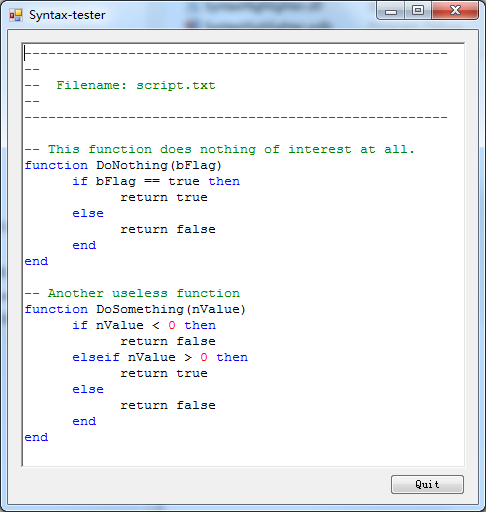
在窗体Load事件添加如下测试代码
  private void MainForm_Load(object sender, EventArgs e)
        {
            // Add the keywords to the list.
            m_syntaxRichTextBox.Settings.Keywords.Add("function");
            m_syntaxRichTextBox.Settings.Keywords.Add("if");
            m_syntaxRichTextBox.Settings.Keywords.Add("then");
            m_syntaxRichTextBox.Settings.Keywords.Add("else");
            m_syntaxRichTextBox.Settings.Keywords.Add("elseif");
            m_syntaxRichTextBox.Settings.Keywords.Add("end");

            m_syntaxRichTextBox.Settings.Keywords.Add("string");
            m_syntaxRichTextBox.Settings.Keywords.Add("int");
            m_syntaxRichTextBox.Settings.Keywords.Add("double");

            // Set the comment identifier. For Lua this is two minus-signs after each other (--).
            // For C++ we would set this property to "//".
            m_syntaxRichTextBox.Settings.Comment = "--";

            // Set the colors that will be used.
            m_syntaxRichTextBox.Settings.KeywordColor = Color.Blue;
            m_syntaxRichTextBox.Settings.CommentColor = Color.Green;
            m_syntaxRichTextBox.Settings.StringColor = Color.Gray;
            m_syntaxRichTextBox.Settings.IntegerColor = Color.Red;

            // Let's not process strings and integers.
            m_syntaxRichTextBox.Settings.EnableStrings = true;
            m_syntaxRichTextBox.Settings.EnableIntegers = true;

            // Let's make the settings we just set valid by compiling
            // the keywords to a regular expression.
            m_syntaxRichTextBox.CompileKeywords();

            // Load a file and update the syntax highlighting.
            m_syntaxRichTextBox.LoadFile("../script.lua", RichTextBoxStreamType.PlainText);
            m_syntaxRichTextBox.ProcessAllLines();
        }
DEMO和自定义控件下载地址

本文链接:http://likelys.com/article/10557
posted @ 2016-09-22 13:51:42
